Automotive UX · Haptic Interaction · Human Factors Research
Designing Vibrotactile Alerts for Driving
Purdue University × ZF Group
Overview
A vibration can draw a driver’s attention while their eyes and ears are already busy. We tested where to place that vibration and how strong to make it for two situations: getting a driver’s attention during manual driving and asking them to take back control from an automated vehicle.
Background & Research Questions
Modern vehicles increasingly rely on visual and auditory alerts to communicate important information. However, these channels can become overloaded when drivers are managing multiple tasks or attending to complex driving situations. Haptic feedback offers an alternative communication channel without adding further demands to these already engaged sensory resources. Its effectiveness may vary depending on driving mode, task demands, and feedback design.
This raises an important UX design challenge: How should haptic feedback be tailored to different driving contexts to support effective, intuitive, and comfortable interactions?
Our research focused on three questions:
- Haptic Design: How do vibration location and intensity affect driver responses and perceptions?
- Task Demands: How does secondary task engagement influence the effectiveness of haptic feedback?
- Adaptive Design: How can findings from manual and automated driving inform future context-aware haptic interfaces?
Research Approach
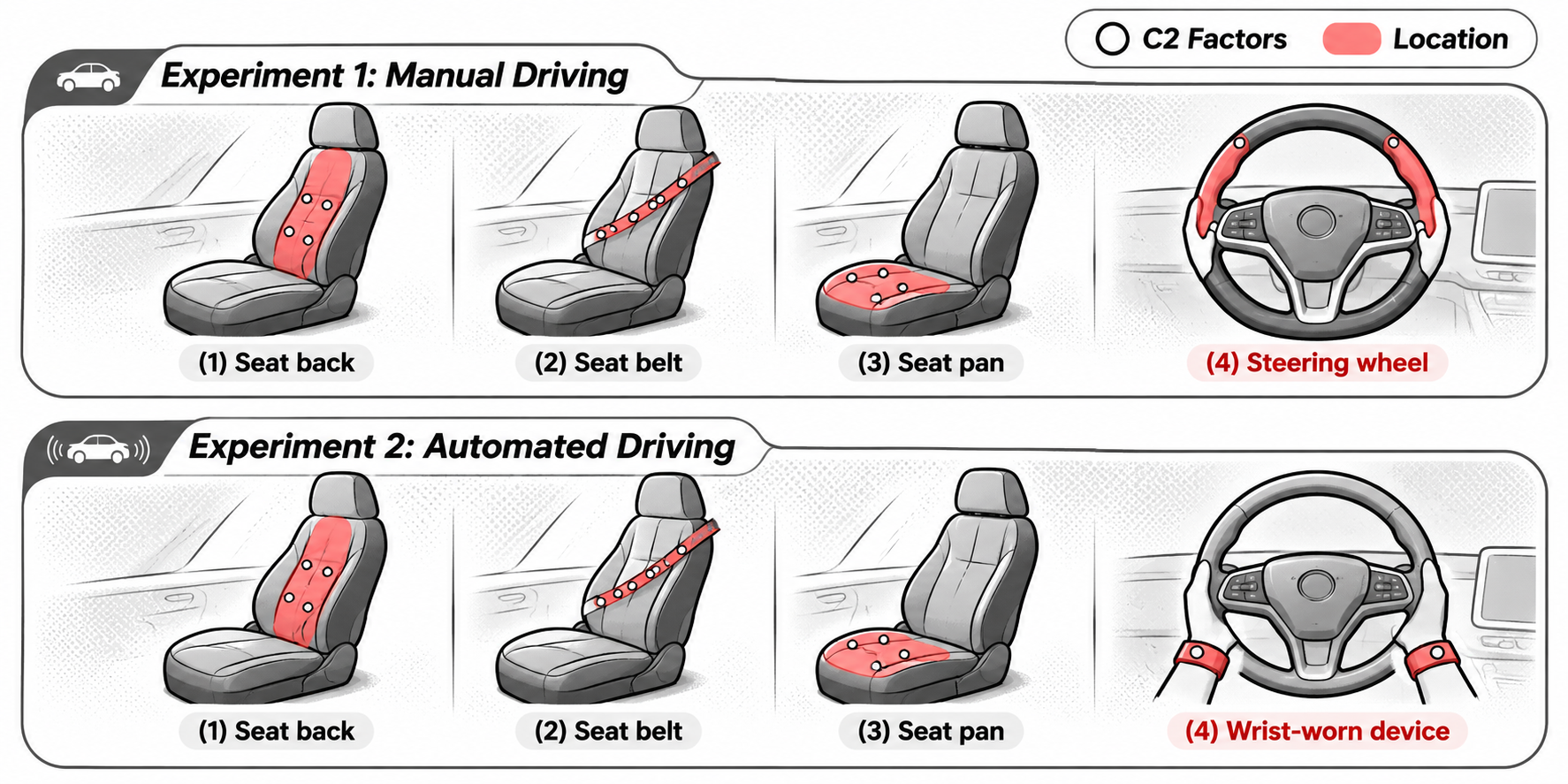
We ran two driving simulator experiments with 40 licensed drivers, 20 per experiment. In both, we varied vibration strength and location and tested alerts with and without a secondary task.
We measured response times and vehicle control, including takeover timing in the Level 3 study. Drivers also rated urgency, annoyance, and workload.
- Manual driving. Drivers acknowledged the alert with a button press while maintaining speed and lane position. We tested vibrations at the seat back, seat belt, seat cushion, and steering wheel.
- Level 3 automated driving. Drivers responded to a takeover request and changed lanes to avoid a stopped vehicle. We tested the same three seat and belt locations and used a wrist-worn device as the fourth location.
Key Insights
- Placement shaped response speed. Steering-wheel alerts produced the slowest responses in manual driving. Stronger vibrations at the seat cushion shortened responses in both experiments. Stronger wrist vibrations also shortened responses in the Level 3 experiment.
- Stronger alerts shortened simulated takeovers. In the Level 3 experiment, mean takeover time fell from 1.93 seconds at low intensity to 1.73 seconds at high intensity.
- Perceived urgency and response speed told different stories. Drivers rated the seat cushion as less urgent than the seat belt in manual driving and less urgent than the wrist in Level 3. Seat cushion alerts could still prompt fast responses.
- Task demand changed the effect on vehicle control. In manual driving, stronger cues were followed by smoother changes in acceleration when drivers had a secondary task and more abrupt changes when driving was their only task.
UX Design Implications
Choose where the driver feels a cue and how strong it is together. Test whether it gets noticed, conveys the intended urgency, and supports a smooth response in the driving situation it is designed for. The seat cushion is a candidate for cues that need a quick response with a lower sense of urgency.
The two experiments used different tasks and were analyzed separately. The simulator results can guide prototype choices. Production settings would need to be calibrated and validated in vehicles.
Manuscript
Zang, J., Huang, G., Lo, W.-H., & Pitts, B. J. (2026). Where, How Strong, and Under What Demand? Driver Responses and Perception to Vibrotactile Signal Parameters Across Driving Modes.
The ZF Automotive Group provided partial funding.